Concept project
File Upload and Image Processing Service in Node.js
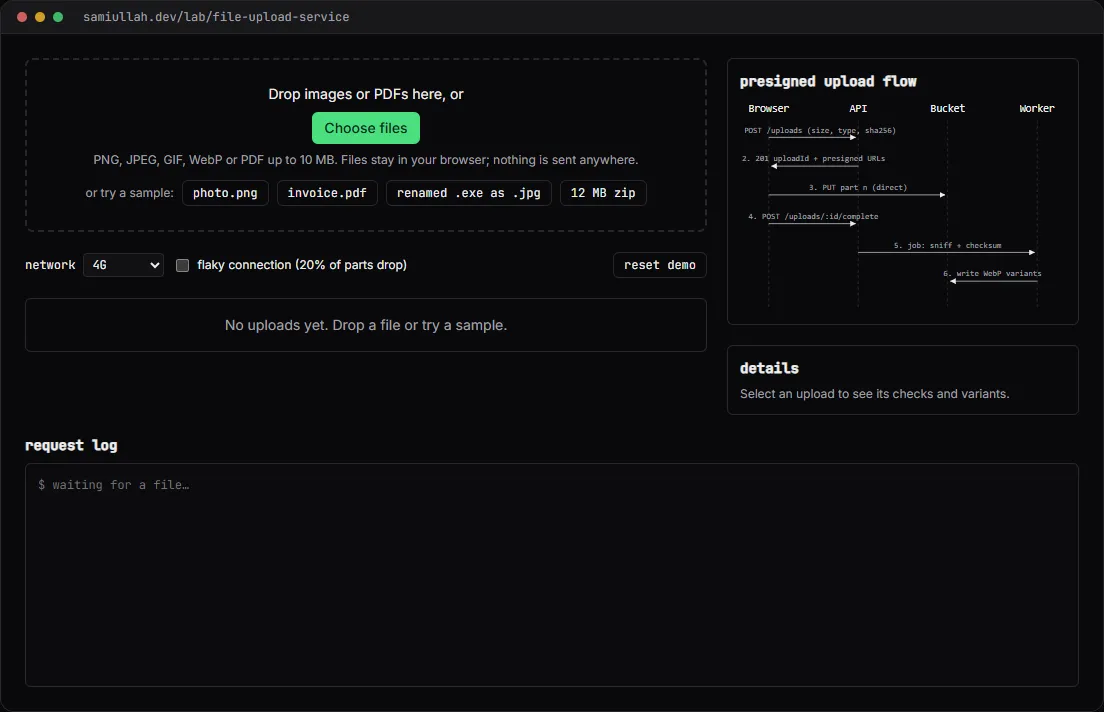
A concept project with a working demo: an upload pipeline with presigned part URLs, chunked and resumable uploads, magic-byte type checks, SHA-256 verification and WebP thumbnails. Files never leave the browser in the demo; the case study explains the Express.js, S3-compatible storage and sharp design behind it.
Overview#
File uploads are where many web apps get careless. The upload goes through the API server, which holds the whole file in memory. The type check trusts the file extension. A dropped connection at 90% means starting again. And the original 6 MB phone photo, with GPS coordinates in its EXIF data, is served straight to every visitor.
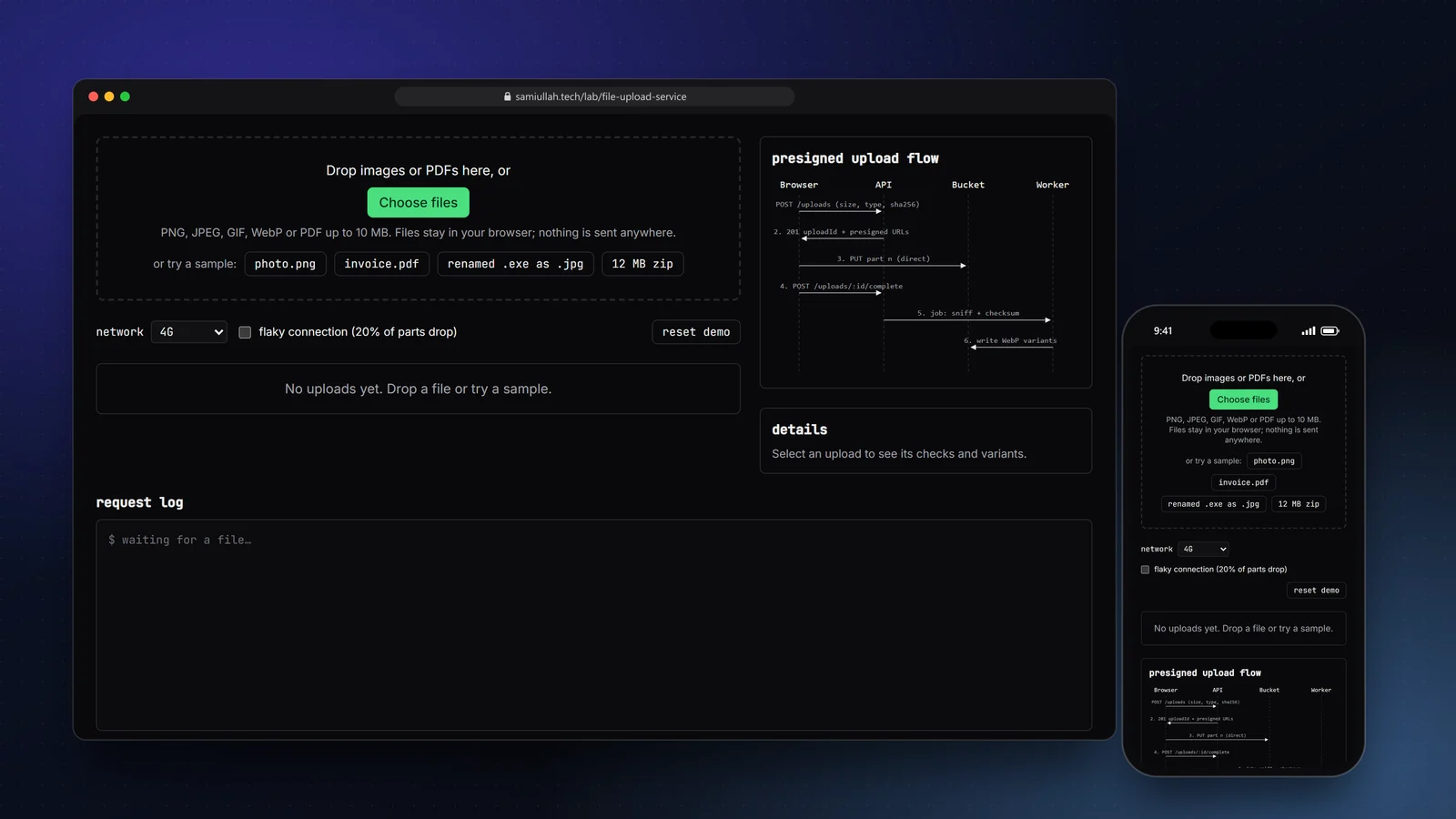
This concept shows the design I would use instead: the browser uploads straight to object storage in parts, the server checks what actually arrived, and a worker produces web-sized images. The live demo runs the whole flow on real files you pick, without sending them anywhere.
My role#
Everything: the API design, the checks, the part and resume logic, the image step, the demo UI and this write-up. It is a concept project, not client work.
The problem#
- Large files through the API. Streaming a 10 MB file through Node.js ties up a connection and memory for the whole transfer, multiplied by every concurrent upload.
- Lying files. A file named
holiday-photo.jpgcan be a Windows executable. The browser'stypecomes from the extension, so it lies too. - Flaky networks. Mobile uploads fail half-way. A single PUT means starting from zero.
- Silent corruption. Without a checksum, a truncated or altered object looks like a success.
- Heavy originals. Visitors should get a 768 px WebP, not a 4000 px JPEG with location metadata.
Approach & architecture#
- Browserthen
- sniff + SHA-256then
- POST /uploadsthen
- 201 uploadId + part URLs
- Browserthen
- PUT part 1..n (direct to bucket)then
- ETag per part
- Browserthen
- POST /uploads/:id/completethen
- worker
- workerthen
- re-sniff + compare SHA-256then
- rejected
- workerthen
- resize + WebP + strip EXIFthen
- ready
Keep bytes off the API. POST /uploads only receives metadata: name, size, declared type and the client's SHA-256. It checks the policy and answers with an upload id. Each 512 KB part gets a short-lived presigned URL, and the browser PUTs it straight to the bucket. The API handles a few small JSON requests per file, whatever its size.
Trust bytes, not names. The demo reads the first bytes of the file and compares them with known signatures:
const SIGNATURES: Sig[] = [
  { mime: "image/png", label: "PNG", test: (b) => at(b, 0, [0x89, 0x50, 0x4e, 0x47, 0x0d, 0x0a, 0x1a, 0x0a]) },
  { mime: "image/jpeg", label: "JPEG", test: (b) => at(b, 0, [0xff, 0xd8, 0xff]) },
  { mime: "application/pdf", label: "PDF", test: (b) => ascii(b, 0, "%PDF-") },
  { mime: "application/x-msdownload", label: "Windows executable (MZ)", test: (b) => ascii(b, 0, "MZ") },
  // ...
];
The browser runs this check too, but only to warn early. The client can lie in POST /uploads, so the authority is the worker step after completion, which sniffs the stored object again and compares its SHA-256 with the declared one:
export async function verifyObject(rec: UploadRecord, object: Uint8Array) {
  if (object.length !== rec.size) return { ok: false, error: `size mismatch` };
  const actual = sniff(object.slice(0, 512));
  if (actual.mime !== rec.declaredType) return { ok: false, error: `content is ${actual.label}` };
  if ((await sha256Hex(object)) !== rec.sha256) return { ok: false, error: "checksum mismatch" };
  return { ok: true };
}
Resume by asking the bucket. Pausing finishes the current part and stops. Resuming calls the equivalent of ListParts and sends only what is missing. If the page is reloaded, the demo marks the upload as interrupted. Selecting the same file again finds the record by its SHA-256 and continues from the next part.
In the production design the record lives in PostgreSQL and processing is a job row claimed with FOR UPDATE SKIP LOCKED:
CREATE TABLE uploads (
  id             text PRIMARY KEY,
  owner_id       bigint NOT NULL,
  object_key     text NOT NULL UNIQUE,
  filename       text NOT NULL,
  size_bytes     bigint NOT NULL CHECK (size_bytes <= 10485760),
  declared_type  text NOT NULL,
  sha256         char(64) NOT NULL,
  status         text NOT NULL DEFAULT 'uploading',  -- uploading | processing | ready | rejected
  variants       jsonb NOT NULL DEFAULT '[]',
  created_at     timestamptz NOT NULL DEFAULT now()
);
Key challenges#
- Real work, no server. I wanted the checks to be real, not a status flag. The demo hashes your file with
crypto.subtle.digest, splits it withBlob.slice, stores parts in an in-memory bucket, reassembles them and hashes again. A mismatch would show up. - Retrying parts, not files. With the flaky network on, about one part in five drops part-way. Only that part is retried, with a 300, 600, 1200 ms backoff. After four failures the upload pauses instead of looping.
- Thumbnails without a library.
createImageBitmapapplies EXIF orientation, and drawing to a canvas copies pixels only, so re-encoding to WebP strips metadata. In production sharp does the same with.rotate()and no.withMetadata(). - Signed URLs that expire. Each part URL carries an HMAC-SHA256 signature over method, key, part number, upload id and expiry. Storage refuses any URL whose signature does not match or whose time is up.
Tech stack#
- Demo: TypeScript, React and Next.js, the Web Crypto API for SHA-256 and HMAC, and the Canvas API for variants. Logic lives in
upload.tsandimages.ts; upload records are kept inlocalStorage. - Production design: Node.js with Express.js, S3-compatible storage through the AWS SDK v3 (MinIO locally, R2 in production), sharp in a worker process, and PostgreSQL for upload records and the job table.
Results#
- A working pipeline on real files: magic-byte detection for ten formats, size, type and extension policy, SHA-256 before and after upload, 512 KB parts with presigned URLs, pause, resume (also after a reload), abort, part-level retries and WebP variants at 320, 768 and 1600 px.
- Two built-in samples are refused at different stages: a renamed executable by the worker after completion, and a 12 MB zip at
POST /uploadswith413before any bytes are sent. - The code under "View source" on the demo page is the code that runs.
There are no upload speed numbers here: the network is simulated, and this is a concept build without real users.
Try the demo#
Open the file upload demo. Things to try:
- Press renamed .exe as .jpg. It passes the first check, uploads, and is rejected by the worker because its bytes start with
MZ. - Set the network to slow 3G, drop a photo, press pause, then resume. Only the missing parts are sent.
- Tick flaky connection and upload the sample photo. Watch dropped parts retry in the request log.
- Start an upload, reload the page, then select the same file again. It continues where it stopped.
What I would do next#
- Build the Express.js API against MinIO in Docker with integration tests for each rejection path.
- Switch the demo signature to real AWS Signature V4 so the URL format matches S3 exactly.
- Add per-user quotas and a nightly cleanup job for abandoned multipart uploads.