Concept project
Kanban Board with Keyboard Drag and Drop
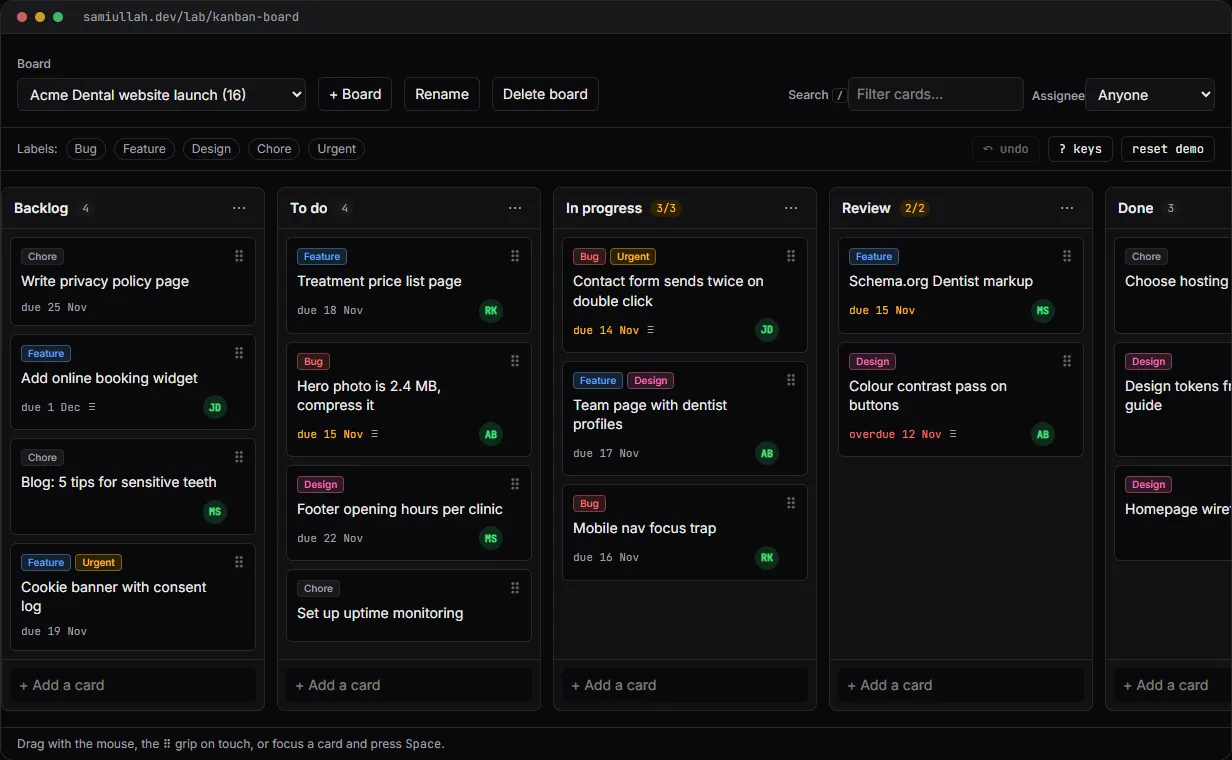
A concept project with a working demo: a multi-board kanban in React where cards move by mouse, touch or keyboard, columns enforce WIP limits, and every change can be undone. Drag and drop is built on plain pointer events with no library,, and all board logic lives in one pure reducer with undo.
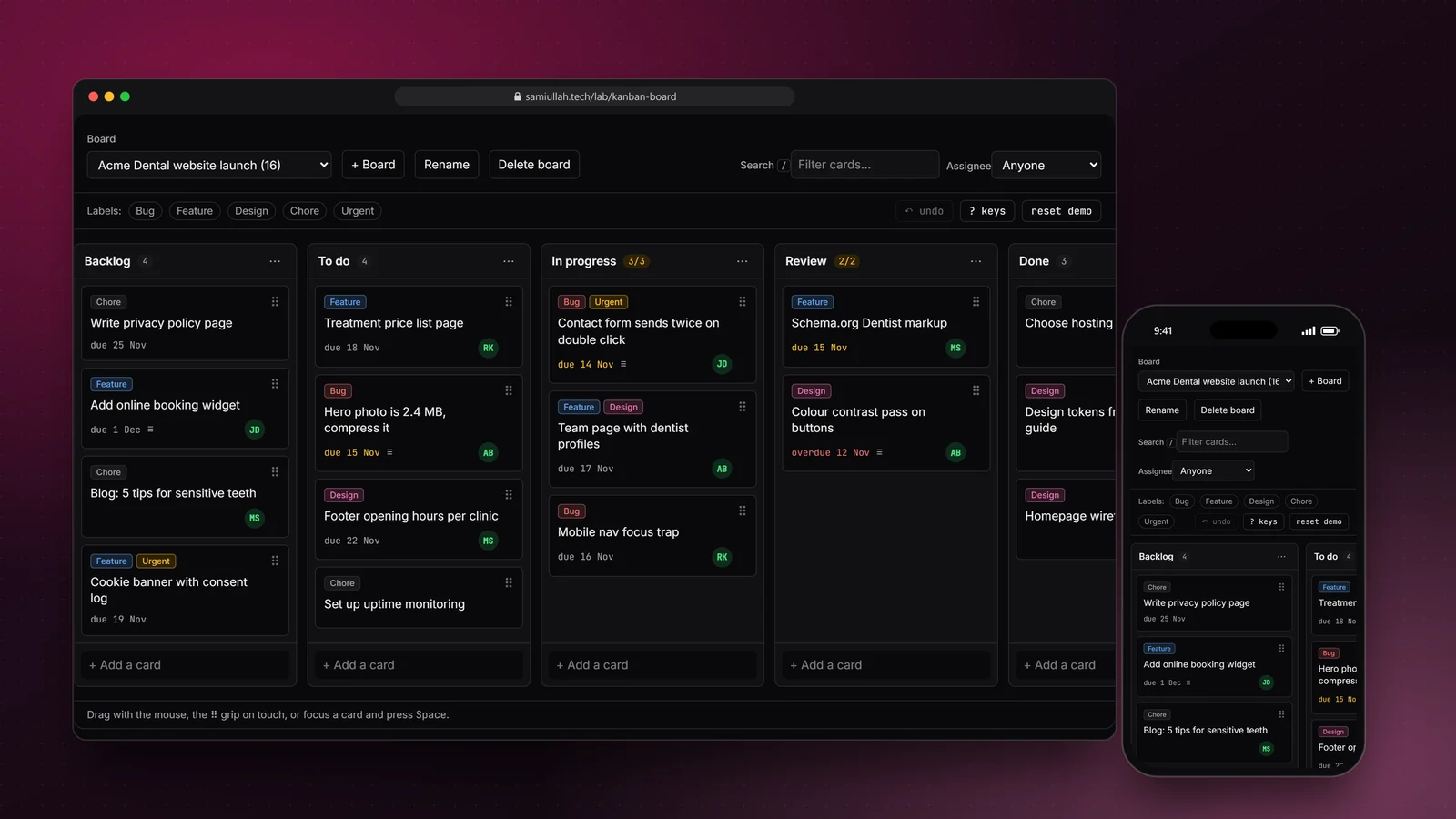
Overview#
Most kanban demos stop at "you can drag a card with a mouse". The hard parts of a board are elsewhere: moving cards without a mouse, rules that refuse a move, keeping the order right while a filter is on, and undoing a mistake.
I built this board to show those parts working together. The live demo has two boards, five columns with WIP limits, labels, assignees, due dates, a card drawer, search, and undo for every change. It runs in your browser and saves to localStorage.
My role#
Everything: the data model, the reducer, the drag and drop code, the keyboard interaction, the UI and this write-up. It is a concept project, not client work. The sample boards describe a fictional website launch for "Acme Dental".
The problem#
A drag and drop board has three groups of users that most builds treat very differently:
- Mouse users expect a card to follow the cursor and show where it will land.
- Touch users need the page to keep scrolling, so a drag cannot start from any touch on a card.
- Keyboard and screen reader users need a way to pick up a card, move it step by step, hear where it is, and cancel.
On top of that, the board has business rules. A column with a WIP limit of 3 should refuse a fourth card, whichever input moved it. And because people make mistakes on boards all the time, every change should be undoable.
Approach & architecture#
- Mouse dragthen
- hit testthen
- card/move action
- Keyboard liftthen
- preview boardthen
- Spacethen
- card/move action
- Card drawerthen
- column selectthen
- card/move action
- card/move actionthen
- canMove (WIP rule)then
- reducerthen
- history stackthen
- localStorage
One reducer, plain actions. Every change is an action such as card/move, column/wip or board/delete. The reducer is a pure function in board.ts, with no React in it. Before applying a change it pushes the previous boards onto a history stack capped at 40 entries:
function commit(s: State, label: string, boards: Board[], extra: Partial<State> = {}): State {
  const past = [...s.past, { boards: s.boards, label }].slice(-HISTORY_LIMIT);
  return { ...s, ...extra, boards, past, seq: s.seq + 1 };
}
Undo pops the stack. Because state is never mutated, old snapshots share structure with new ones and the history stays cheap. The label ("move card", "delete column") is shown on the Undo button, so you know what you are undoing.
Rules in one place. The WIP limit is a single function. Mouse drop, keyboard move and the drawer's column select all call it before dispatching, and the reducer calls it again as a guard:
export function canMove(board: Board, cardId: string, toColumn: string): MoveCheck {
  const from = findCard(board, cardId);
  const target = board.columns.find((c) => c.id === toColumn);
  if (!from || !target) return { ok: false, reason: "Card or column no longer exists." };
  if (from.column.id === target.id) return { ok: true };
  if (target.wip !== null && target.cardIds.length >= target.wip) {
    return { ok: false, reason: `“${target.title}” is at its WIP limit (${target.wip}). Finish something first.` };
  }
  return { ok: true };
}
Drag and drop on pointer events. I did not add a drag library. On pointerdown the demo records the offset inside the card. After the pointer moves 5 pixels it becomes a drag: a floating copy follows the cursor, and each move hit-tests the column rectangles and the midpoints of the cards inside to find the drop index. While dragging, a column that would refuse the card turns red before you let go.
In the production design, the same action would go to an API and be applied optimistically:
-- in the production design: fractional ordering, so one move updates one row
CREATE TABLE cards (
  id         uuid PRIMARY KEY,
  column_id  uuid NOT NULL REFERENCES columns(id) ON DELETE CASCADE,
  position   text NOT NULL,          -- fractional index, e.g. 'a0', 'a0V', 'a1'
  title      text NOT NULL,
  updated_at timestamptz NOT NULL DEFAULT now()
);
CREATE INDEX cards_column_position ON cards (column_id, position);
Key challenges#
- Keyboard moves without committing every step. If each arrow key dispatched a real move, undo would need ten presses to reverse one drag. Instead, a lifted card creates a preview: the board is rendered as
moveCard(board, …)of the current target, and only Space commits onecard/move. Escape drops the preview and nothing changed. - Focus after a move. Moving a card to another column re-mounts its element, which loses focus. After each preview step an effect puts focus back on the card by its
data-card-id, so arrow keys keep working. - Screen reader feedback. A live region says "Picked up … in To do, position 2", then the column and position after each arrow key, and whether a WIP limit blocked the move.
- Touch versus scroll. With
touch-action: noneon the whole card, nobody could scroll the board on a phone. The grip icon is the only touch drag handle; the rest of the card scrolls normally. - Filters and drop positions. Hiding filtered cards would make "drop at position 3" mean different things depending on the filter. The demo dims non-matching cards instead, so positions always match the stored order.
Tech stack#
- Demo: TypeScript, React 19 and Next.js. Pointer and keyboard events only; no drag and drop or state library. Board logic is in
board.ts, the UI inDemo.tsxandCardDrawer.tsx. State persists inlocalStorage; undo history stays in memory. - Production design: the same reducer on the client for optimistic updates, a NestJS API with one endpoint per action, PostgreSQL with fractional position keys, and WebSocket broadcasts so other people on the board see moves live.
Results#
- A working board with create, edit, delete, drag, keyboard moves, WIP limits, label and assignee filters, search, multiple boards and undo, all in one page.
- The same rule check runs for mouse, keyboard and drawer moves, so there is no input method that can bypass a WIP limit.
- Every change, including deleting a column with its cards or deleting a whole board, can be undone from the toolbar or with
u. - The full source is shown under "View source" on the demo page. Nothing is mocked behind the UI.
This is a concept build without real users, so there are no usage or performance numbers to report.
Try the demo#
Open the kanban board demo. Things to try:
- Drag "Treatment price list page" into In progress. The column is at its limit of 3, so it turns red and refuses the card.
- Tab to a card, press Space, move it with the arrow keys, then press Space again. Try Escape halfway through.
- Delete the Review column from its ⋯ menu, then press undo.
- Click the Bug label filter and type "nav" in search to see matching cards stay bright.
What I would do next#
- Write Vitest unit tests for every reducer action and a Playwright test that drags by mouse and by keyboard.
- Move the reducer behind a NestJS API with fractional ordering and optimistic updates that roll back on a 409.
- Add live presence and sync over WebSockets, with a per-card version number to detect conflicting moves.
- Let columns be reordered by drag as well as by the move buttons.