Concept project
NestJS REST API with Auth, RBAC and Swagger
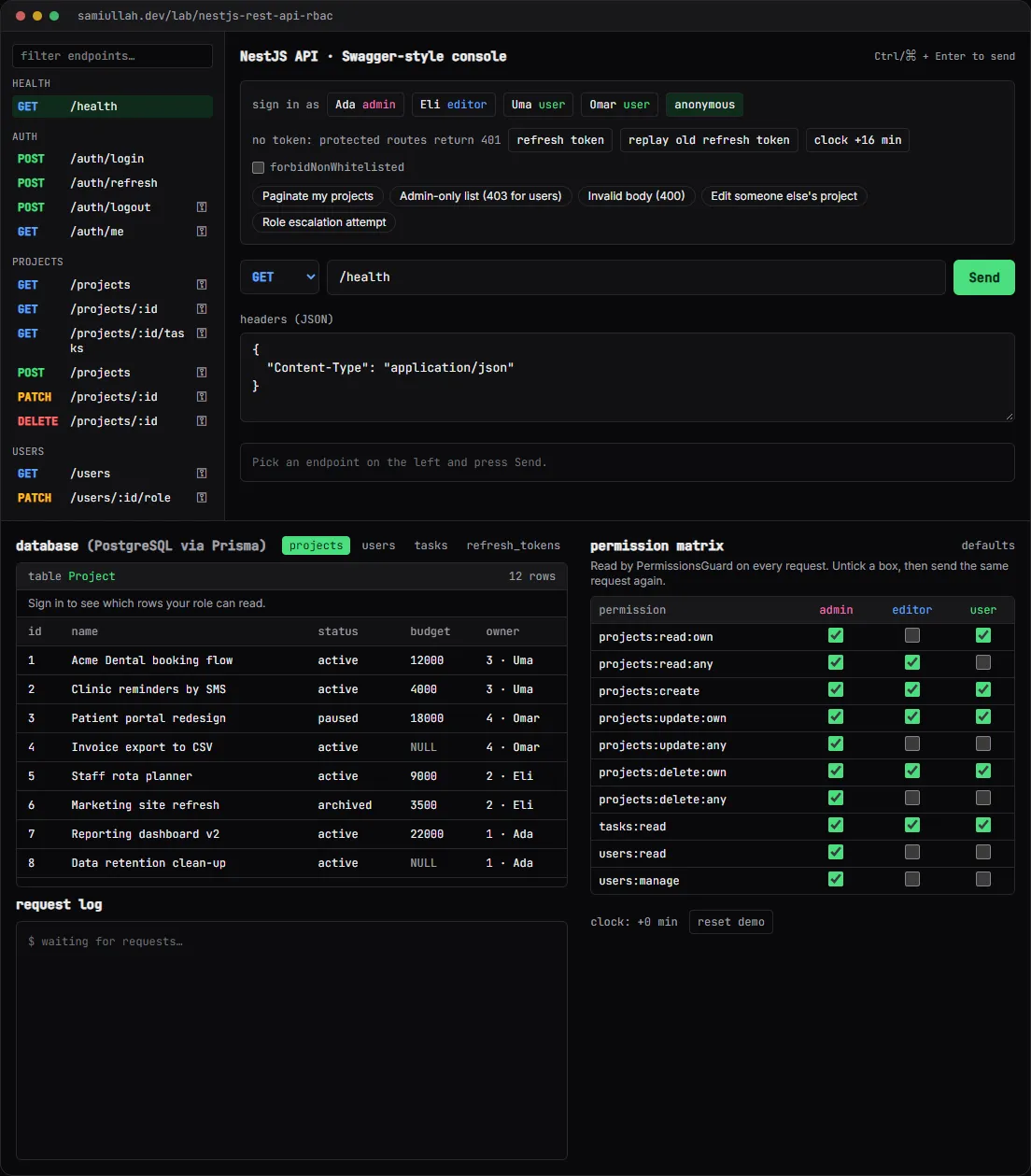
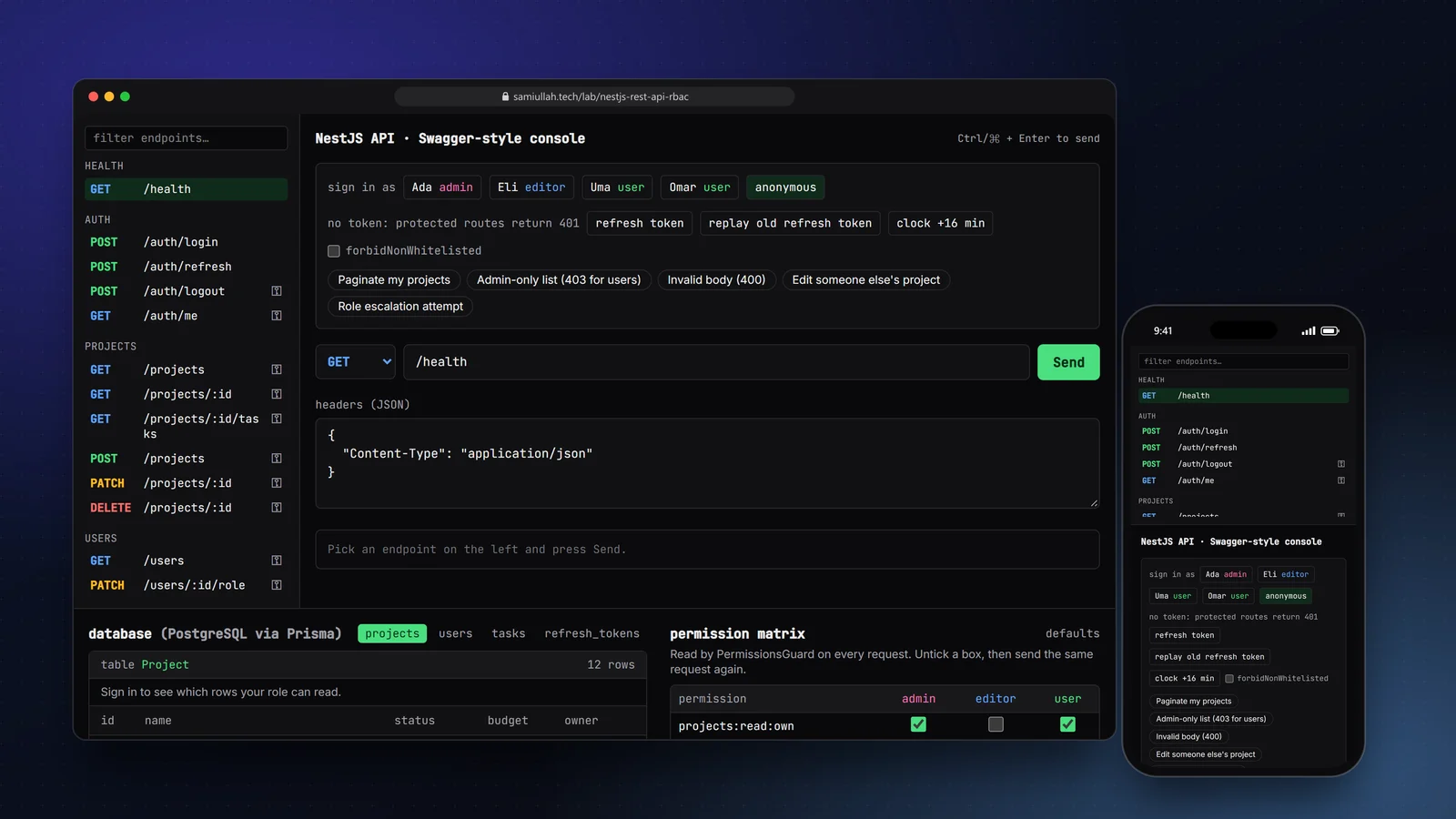
A concept project with a working demo: a simulated NestJS REST API with JWT login, rotating refresh tokens, a permission matrix you can edit, validation errors with field messages and cursor pagination. Each request shows which guard or pipe passed or failed, and the SQL it would run.
Overview#
Most API projects I have joined got authentication working early and permissions working late. Roles end up as if (user.role === "admin") checks scattered through services, validation is half in the controller and half in the database, and nobody is sure which endpoint returns 401 and which returns 403.
This concept is the foundation I would put in place on day one of a NestJS project. The live demo is an API simulator that runs in your browser: a Swagger-style endpoint list, an editable request console, the database tables and a request log. You sign in as different users and see exactly which layer accepts or refuses each call.
My role#
Full build: API design, the permission model, the guard and pipe chain, the simulator UI and this write-up. It is a concept project, not client work. The demo accounts and projects are fictional.
The problem#
A typical back office API has three kinds of users. Admins manage people. Editors can see every project but change only their own. Ordinary users can only touch what they created. The rules sound simple, but they have to hold for every endpoint, and they change: a client asks for "editors can archive but not delete" six months in.
What I wanted:
- Unauthenticated calls get 401, authenticated calls without the right permission get 403, and reading someone else's record gets 404 so ids cannot be probed.
- Permissions live in data, so a rule change is a row change, not a deploy.
- Bad input is refused with 400 and a message per field, and unknown fields such as
roleorownerIdnever reach the service. - Refresh tokens rotate, and a stolen token that is replayed kills the whole session family.
Approach & architecture#
Nest already has a place for each concern. I kept to it, so the request lifecycle is easy to explain and to test.
- Requestthen
- LoggerMiddlewarethen
- JwtAuthGuardthen
- PermissionsGuardthen
- ValidationPipethen
- Controllerthen
- Servicethen
- Prisma
- Servicethen
- HttpExceptionthen
- ExceptionFilterthen
- JSON error
Permissions, not roles, on routes. A route declares what it needs. A role is just a named set of permissions, stored in a role_permissions table in the production design and editable as a matrix in the demo. Ownership rules use an :own and an :any variant of the same permission.
In the production design the controller looks like this:
@Patch(":id")
@RequirePermissions("projects:update:own", "projects:update:any")
update(@Param("id", ParseIntPipe) id: number, @Body() dto: UpdateProjectDto, @CurrentUser() user: AuthUser) {
  return this.projects.update(id, dto, user);
}
The guard only answers "may this role call this route at all". The service then decides about this specific row. That split is visible in the demo module too:
function assertCan(ctx: Ctx, p: Project, any: Permission, own: Permission, verb: string) {
  if (ctx.can(any)) return;
  if (ctx.can(own) && p.ownerId === ctx.user!.id) return;
  throw new ForbiddenException(
    ctx.can(own) ? `You can only ${verb} projects you own` : `Missing permission ${any} or ${own}`,
  );
}
Validation with whitelisting. The global pipe is configured with whitelist: true, so {"name": "X", "ownerId": 1} reaches the service as {"name": "X"}. With forbidNonWhitelisted switched on, the same body is refused. The error format keeps Nest's flat message array and adds a fields map that a front end can bind to its inputs.
Rotating refresh tokens. Access tokens live 15 minutes. Each refresh token belongs to a family created at login. Using it revokes it and issues the next one. Presenting a token that was already rotated means someone has a copy, so the whole family is revoked.
model RefreshToken {
  id         Int       @id @default(autoincrement())
  userId     Int
  family     String
  tokenHash  String    @unique
  expiresAt  DateTime
  revokedAt  DateTime?
  replacedBy Int?
  user       User      @relation(fields: [userId], references: [id], onDelete: Cascade)
  @@index([family])
}
Cursor pagination. GET /projects takes limit, cursor, status, q and sort. The cursor is an opaque string that points at the last row of the previous page, so inserts between page loads do not cause duplicates the way OFFSET does.
Key challenges#
- 401 versus 403 versus 404. I wrote these down as rules before writing code: no or bad token is 401; valid token but the role lacks the route permission is 403; the record exists but is outside your read scope is 404. The demo's scenario buttons hit each case.
- Role changes must apply at once. If the guard trusted the role inside the JWT, demoting a user would take up to 15 minutes. The JWT strategy's
validate()re-loads the user, so the role in the database wins. You can see this by changing Uma's role withPATCH /users/3/roleas Ada. - Errors must not leave half-written data. Each request in the simulator works on a copy of the database and only commits when the handler returns. That mirrors a Prisma
$transaction. Two cases return instead of throwing on purpose: a failed login has to record the failure for throttling, and refresh-token reuse has to commit the family revocation. - Login enumeration. Wrong email and wrong password give the same message and the same status. Five failures in 15 minutes for one email return 429.
Tech stack#
- Demo: TypeScript, React and Next.js. The simulated server is framework-free TypeScript (
app.ts,auth.ts,validation.ts,db.ts) that you can read under "View source" on the demo page. Shared console and log components are reused by my other backend demos. - Production design: NestJS on Node.js, PostgreSQL with Prisma,
@nestjs/jwtand Passport, argon2id for passwords, class-validator DTOs,@nestjs/swaggergenerating the docs from the same DTOs,@nestjs/throttler, and Jest with Supertest for e2e tests.
Results#
- A working simulator with 13 endpoints across health, auth, projects and users, each showing its guard and pipe trace and the SQL it would run.
- The permission matrix is live: changing a checkbox changes the next response, with no other code involved.
- Validation returns 400 with field messages, strips unknown fields, and rejects them when
forbidNonWhitelistedis on. - Refresh rotation and reuse detection can be tried with two buttons, and the
refresh_tokenstable shows the revoked family.
The demo proves the design and the rules, not performance. It is a concept build without real users.
Try the demo#
Open the NestJS REST API demo. Things to try:
- Sign in as Uma, then run "Admin-only list". You get 403 from
PermissionsGuard. Sign in as Ada and send it again. - Sign in as Eli and run "Edit someone else's project". Eli can read every project, so the guard passes, but project 1 belongs to Uma and the service answers 403. As Omar the same call is a 404.
- Run "Invalid body" to see the 400 with a
fieldsmap, then tickforbidNonWhitelistedand try "Role escalation attempt". - Press refresh token, then replay old refresh token, and look at the
refresh_tokenstable.
What I would do next#
- Port the route table to real Nest controllers and run the scenario buttons as Supertest e2e cases against a PostgreSQL test database.
- Cache the role-to-permission map per request and bust it when the matrix changes.
- Add field-level permissions, for example editors can change
statusbut notbudget.