Concept project
Vue 3 Quiz App with Timed Exams and Spaced Review
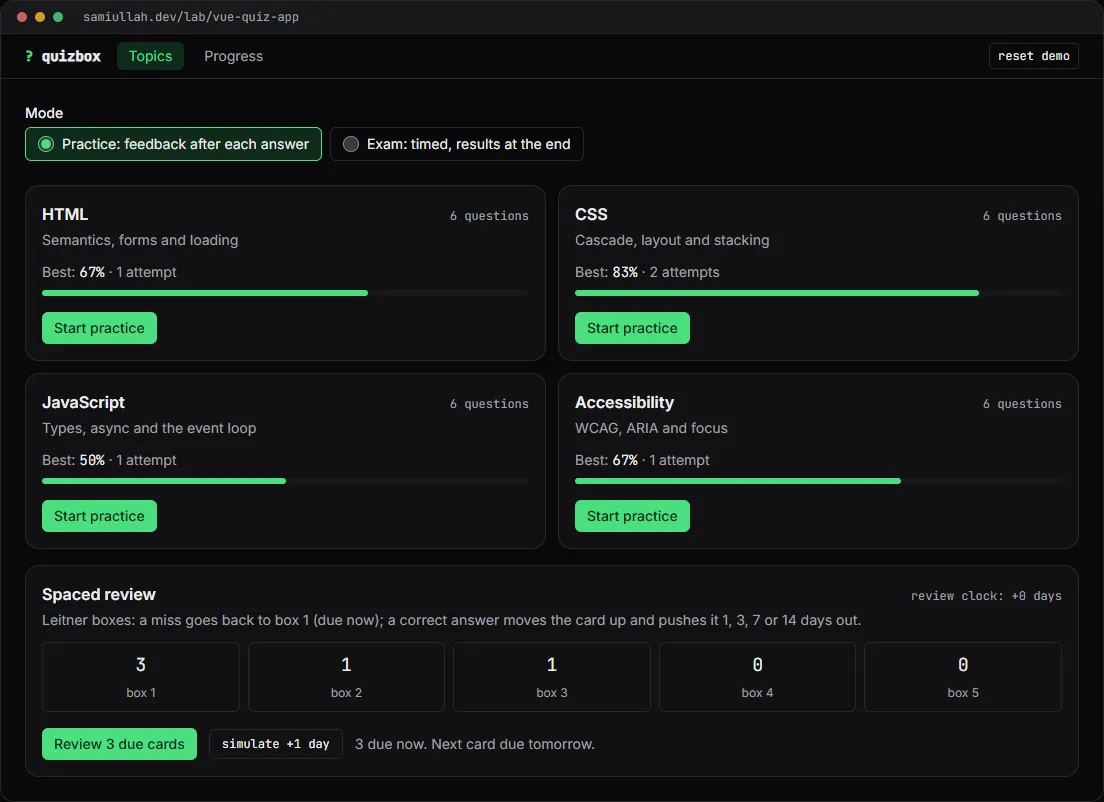
A concept project with a working demo: a quiz app in Vue 3 and Pinia with practice and timed exam modes, four question types with partial credit, an explanation after each answer, spaced review of missed questions and a score history chart. Progress survives a reload, including a running exam clock.
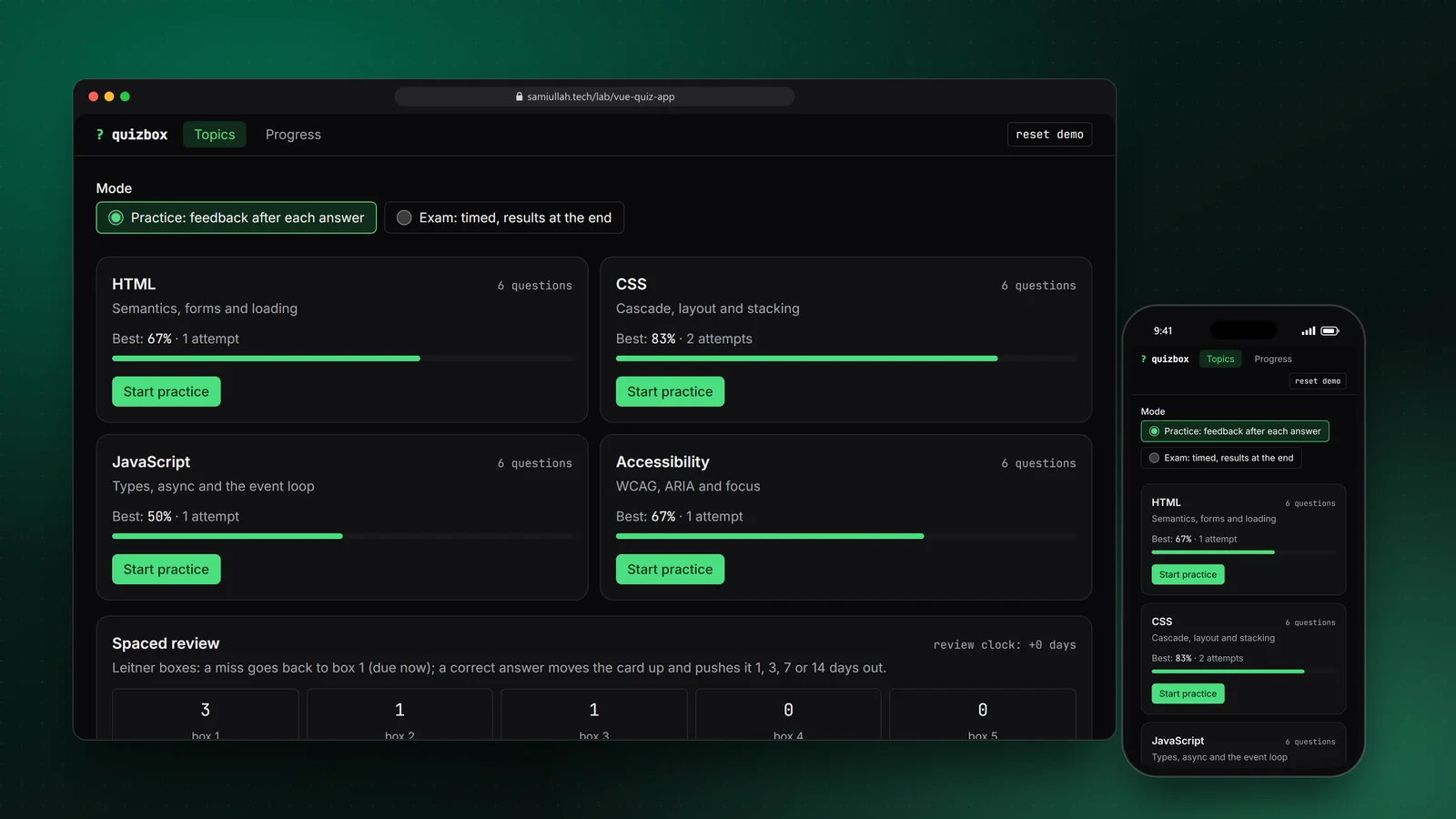
Overview#
A quiz app is a good test of front-end discipline. It looks simple, but it has a state machine (answering, feedback, finished), scoring rules that differ per question type, a timer that must not be fooled by a reload, and a lot of accessibility detail: radio groups, checkbox groups, a drag-and-drop list that also has to work from the keyboard, and results that cannot rely on red and green alone.
I built this concept in Vue 3 with Pinia. The live demo is real Vue code, mounted inside this Next.js site, and the source under the demo is exactly what runs.
My role#
Everything: the question model, the scoring rules, the session state machine, the spaced review scheduler, the Vue components, the 24 sample questions and this write-up. It is a concept project, not client work.
The problem#
Learners return to a quiz app only if it is fair and useful. That breaks down into a few concrete requirements:
- Fair scoring. Ticking every box in a multiple-choice question must not earn full marks. Getting one pair of items swapped in an ordering question should not score the same as a random order.
- An honest exam clock. If the timer lives in component state, reloading the page resets it. The deadline has to be stored, not the remaining time.
- Learning, not just grading. Every answer needs an explanation and a source, and missed questions should come back sooner than ones you already know.
- Usable by everyone. Native form controls, a keyboard path for drag-and-drop, and verdicts shown with an icon and text as well as colour.
Approach & architecture#
- QuestionCard (v-model draft)then
- store.submitCurrent()then
- submit()then
- grade()then
- phase: feedbackthen
- next()
- finish()then
- summary()then
- history entrythen
- schedule() per questionthen
- Leitner boxesthen
- localStorage
Rules in plain TypeScript. quiz.ts has no Vue imports. It holds the question types, the bank, grade(), the session transitions and the Leitner scheduler. Each transition takes a session and returns a new one, so the logic can be unit tested without mounting anything.
One answer shape. Every answer is an array of original option indices: [2] for a single choice, [0, 3] for multiple, [1] for true, and the arranged order for ordering questions. Options are shuffled for display with a seeded generator, but scoring never sees the display order.
case "multiple": {
  const right = response.filter((r) => q.answer.includes(r)).length;
  const wrong = response.length - right;
  const decoys = q.options.length - q.answer.length;
  // share of right options ticked minus share of wrong options ticked
  score = Math.max(0, right / q.answer.length - (decoys ? wrong / decoys : 0));
  break;
}
case "ordering": {
  // share of item pairs in the right relative order
  for (let i = 0; i < n; i++)
    for (let j = i + 1; j < n; j++) {
      pairs++;
      if (response[i]! < response[j]!) ok++;
    }
  score = pairs ? ok / pairs : 0;
  break;
}
A Pinia setup store as the shell. useQuizStore wraps the pure functions and owns the session, the attempt history and the review cards. A deep watcher writes them to localStorage under one versioned key. Components only call store actions such as submitCurrent(), nextQuestion() and end("timeout").
Deadline, not countdown. Starting an exam stores deadline = now + seconds * 1000. The root component ticks a now ref twice a second, and tick() ends the session as a timeout once now >= deadline. Because the deadline is absolute, a reload mid-exam resumes with the correct time left, and a tab closed past the deadline finishes as soon as it opens again.
Leitner review. A fully correct answer moves a card up one box; anything else sends it back to box 1, which is due immediately. Boxes 2 to 5 come back after 1, 3, 7 and 14 days. The demo has a "simulate +1 day" button that only moves the review clock, never the exam timer.
Key challenges#
- Drag-and-drop with a keyboard alternative. The ordering list uses pointer events with pointer capture on a drag handle, and works out the drop position from item midpoints. Each row also has up and down buttons, and every move is announced in a live region ("Moved A to position 2 of 4").
- Answered versus touched. An ordering question always has some order, so "has a value" cannot mean "answered". The session keeps unsaved drafts apart from submitted responses, and only submitted responses are scored. A timeout says how many unsaved questions scored zero.
- Vue inside React. The site is Next.js, so a small React component mounts the Vue app in an effect and unmounts it on cleanup. It loads Vue's full build so
templatestrings compile in the browser; that build registers the compiler once, so the components still import from plainvue. - Not colour alone. Every verdict has an icon and words (✓ Correct, ◐ Partly correct, ✗ Not correct), wrong options in the review say "Your choice, not correct", and the score chart has a table view.
Tech stack#
- Demo: TypeScript, Vue 3 (Composition API,
defineComponentwith templates), Pinia, mounted in a Next.js page through a small React wrapper. Charts are hand-written SVG. State is kept inlocalStorage. - Production design: a standalone Vue 3 app built with Vite and single-file components (templates precompiled, no runtime compiler), Pinia with the same store, Vitest unit tests for
grade(), the state machine andschedule(), and a PWA service worker so practice works offline. The Next.js wrapper would not be needed there.
Results#
- A working quiz with four question types, practice and exam modes, partial credit, explanations with sources, a review screen, spaced review and a history chart.
- Reloading mid-quiz resumes the same question, the same option order and the same deadline.
- The ordering question can be solved with a mouse, a finger or only the keyboard.
- All scoring and scheduling rules are in one framework-free module that can be read under "View source" on the demo page.
There are no usage or learning-outcome numbers because this is a concept build without real users.
Try the demo#
Open the quiz app demo. Things to try:
- Start the JavaScript topic in practice mode and solve the event-loop ordering question with the arrow buttons only.
- In a multiple-choice question, tick every option and check: you get zero points, not full marks.
- Switch to exam mode with "15 s in total", save one answer and wait. The quiz ends on its own and scores only what you saved.
- Start an exam, reload the page and see it resume with the clock still running.
What I would do next#
- Move the components to single-file components in a Vite build and add Vitest tests for every scoring rule.
- Add a short-text question type with accepted variants and a normaliser.
- Sync attempts and review boxes to an API so progress follows the learner across devices.