Concept project
WooCommerce Store Customization
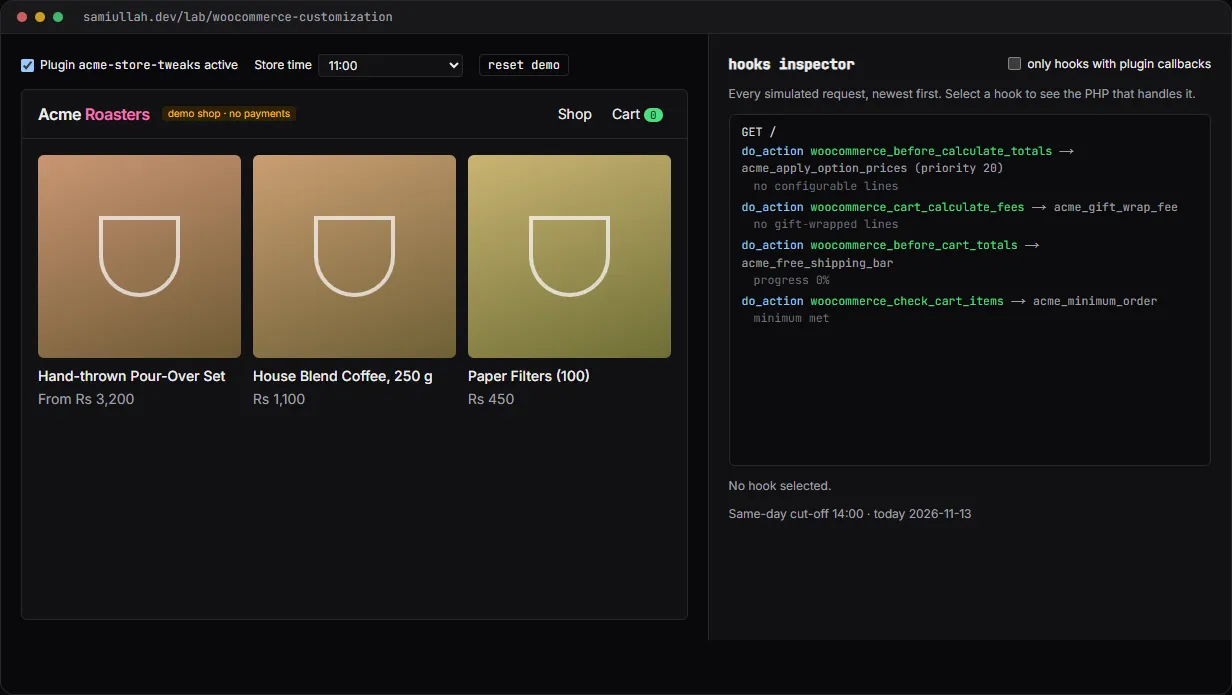
A concept project with a working demo: a WooCommerce shop customised only through hooks. A product configurator changes the price, gift wrap is a per-line fee, checkout gets a delivery date validated on the server, and a hooks inspector shows every action and filter as it fires with the PHP that handles it.
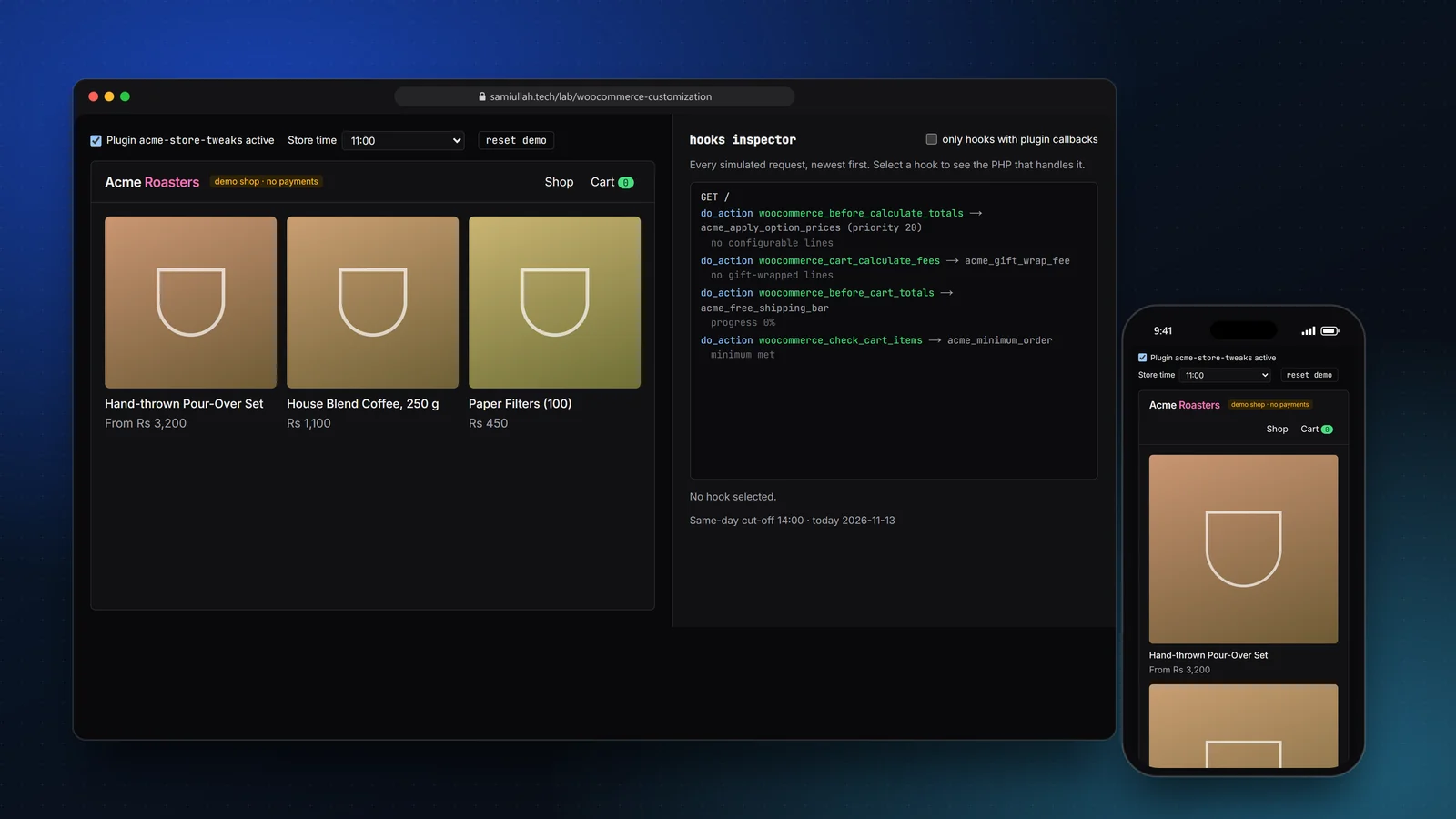
Overview#
Most WooCommerce work is not building a shop. It is changing how an existing shop behaves without breaking the next update. That means hooks, not edited plugin files and not a pile of template overrides.
This concept collects the changes I see asked for most often in one small site plugin: product options that change the price, gift wrap, a free-delivery progress bar, a minimum order, a cleaner checkout, and a delivery date with real business rules. The live demo runs the flow in the browser and shows every hook as it fires.
My role#
Everything: the plugin design in PHP, the browser simulation of the WooCommerce hooks, the demo shop and this write-up. It is a concept project; the shop, products and orders are made up.
The problem#
A typical request from a shop owner sounds simple: "Add an engraving option, stop Sunday deliveries, and remove the fields nobody fills in." Done badly, it turns into:
- JavaScript-only validation that anyone can skip in DevTools.
- Prices changed in the template, so the cart, the order and the email disagree.
- Copied WooCommerce templates that go stale on the next release, with System Status showing "outdated overrides".
- Order data written with
update_post_meta, which silently stops working when High-Performance Order Storage (HPOS) is turned on.
Approach & architecture#
Everything lives in one site plugin. Switching the theme does not remove checkout rules, and no WooCommerce template is copied.
- Product formthen
- add_to_cart_validationthen
- add_cart_item_datathen
- cart line with options
- before_calculate_totals (set_price)then
- cart_calculate_fees (gift wrap)then
- package_ratesthen
- check_cart_items (minimum)
- checkout_fieldsthen
- after_checkout_validationthen
- checkout_create_order (HPOS meta)then
- admin panel + email
Options travel with the cart line. In woocommerce_add_cart_item_data the chosen size, glaze and engraving are attached to the line. Because WooCommerce hashes that data into the cart item key, a mug with an engraving and one without become separate lines automatically.
Prices are set in one place. The price is applied in woocommerce_before_calculate_totals, which runs on every totals calculation. The callback always starts from the stored product price, because the hook can run more than once per request:
add_action( 'woocommerce_before_calculate_totals', 'acme_apply_option_prices', 20 );
function acme_apply_option_prices( WC_Cart $cart ): void {
	foreach ( $cart->get_cart() as $item ) {
		if ( empty( $item['acme'] ) || ! acme_is_configurable( $item['data'] ) ) {
			continue;
		}
		$base = (float) wc_get_product( $item['product_id'] )->get_price( 'edit' );
		$item['data']->set_price( acme_configured_price( $base, $item['acme'] ) );
	}
}
The product page preview in the demo calls the same configuredPrice function, so the number on the button always matches the cart.
Rules on the server. The date picker greys out Sundays and closes today after 2 pm. That is only a convenience. The rule itself runs in woocommerce_after_checkout_validation and adds to the WP_Error object WooCommerce passes in:
add_action( 'woocommerce_after_checkout_validation', 'acme_validate_checkout', 10, 2 );
function acme_validate_checkout( array $data, WP_Error $errors ): void {
	$date = sanitize_text_field( $data['acme_delivery_date'] ?? '' );
	$err  = '' === $date ? __( 'Delivery date is a required field.', 'acme' ) : acme_delivery_date_error( $date );
	if ( $err ) {
		$errors->add( 'acme_delivery_date', $err, array( 'id' => 'acme_delivery_date' ) );
	}
}
HPOS-safe order data. The delivery date and gift message are saved with $order->update_meta_data() inside woocommerce_checkout_create_order, and the plugin declares HPOS compatibility. The same values are printed, escaped, in the admin order screen and added to emails through woocommerce_email_order_meta_fields.
Key challenges#
- Showing hooks in a browser. PHP cannot run in the page, so I wrote a small copy of the WordPress Plugin API (
hooks.ts) with priorities and a trace.woo.tsfires hooks in the same order as the WooCommerce code paths, andacme-tweaks.tsis a callback-for-callback twin of the PHP plugin. The inspector reads the PHP file at build time and shows the block for whichever hook you select. - Fees per line, not per unit. Gift wrap is one wrap per cart line, so it is a fee from
woocommerce_cart_calculate_fees, not a price change that multiplies with quantity. - Time zones. "Same day after 2 pm" depends on the shop's clock, not the visitor's. The PHP uses
wp_timezone(); the demo has a store-time dropdown so you can test the cut-off. - Accessible errors. Checkout errors are listed at the top with links to the fields, and each field has its message linked with
aria-describedby.
Tech stack#
- Demo: TypeScript, React and Next.js. A mini hooks engine, a reduced WooCommerce flow and the plugin callbacks as plain modules. Cart and orders are kept in
localStorage. - Production design: WordPress and WooCommerce with one site plugin in PHP (shown in full in the demo's source), HPOS order storage on MySQL, cash on delivery for the demo shop.
Results#
- A working shop flow from product page to order email, with the custom fields visible in the cart, the admin order screen and the email.
- Server-side rules you can try to break: Sunday dates, past dates, same-day after the cut-off, bad phone numbers and oversized engravings are all rejected.
- A plugin switch that shows WooCommerce's default behaviour, so each change can be compared with the original.
- A hooks inspector that lists every hook a request fires, in firing order, including core hooks the plugin does not touch.
This is a concept build with fictional products and no real customers or orders.
Try the demo#
Open the WooCommerce customisation demo. Things to try:
- Configure the pour-over set with an engraving and gift wrap, then add it twice with different options: two cart lines, one gift wrap fee each.
- Add only filters to the cart and see the minimum-order error block checkout.
- At checkout tick Bypass the date picker, type a Sunday, and read the server error. Then set store time to 15:00 and pick today.
- Turn the plugin off and reload the checkout: the default WooCommerce fields return.
What I would do next#
- Run the PHP plugin in a Docker WordPress install with PHPUnit tests for the date rules and a Playwright checkout test.
- Support the block-based Cart and Checkout through the Store API and
woocommerce_store_api_checkout_update_order_from_request. - Move the option prices into product meta so the shop owner can edit them without code.